
Prompt Customization
Jul 16, 2026The look of the terminal windows is a highly personal choice and the information that the command prompt provides you with changes with each person. By default iTerm2 comes with white text on a black screen, I believe, and for the longest time, the only change I made was to change the text color to green and increase the font, I am getting older you know.
Recently, I wanted to update my prompt to better display my name, the directory I was in, and if it was a git repository, what branch I was on.
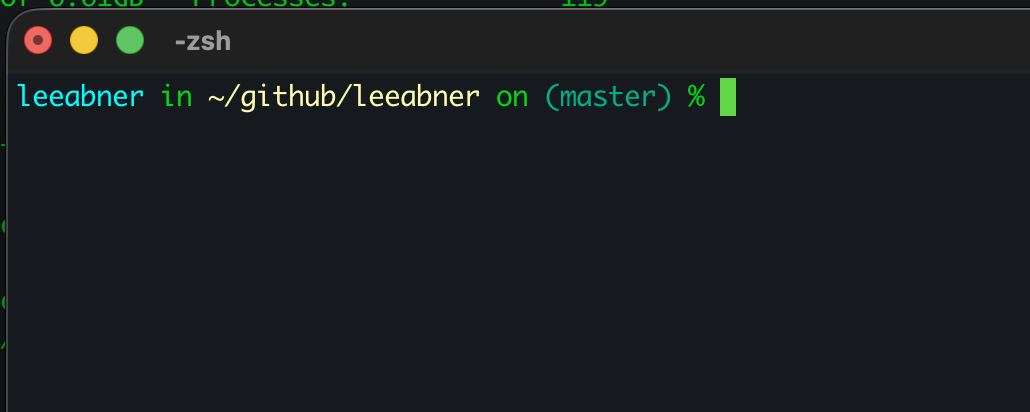
This changes the color of my name to a blueish color, tells me what directory I am in and makes the directory name a different color and lastly, tells me I am on the master branch of the repository in a green color.
To get this information to display like this, we just need to add a few lines of code the the .zshrc file. This is on a Mac and all modern mac use the ZSH shell. You can further expand the customization by install in the Oh My ZSH framework, but that is beyond the scope of this post.
On the Mac, using your favorite editore edit the ~/.zshrc file and add the following lines.
autoload -Uz vcs_info
autoload -U colors && colors

precmd() {
    vcs_info
}

zstyle ':vcs_info:*' enable git
zstyle ':vcs_info:git:*' formats ' on %F{#00af87}(%b)%f'

setopt PROMPT_SUBST


PROMPT='%F{#00ffff}%n%f in %F{#ffffaf}%~%f${vcs_info_msg_0_} %# '
The lines below are used to load the version control system and colors modules.
autoload -Uz vcs_info
autoload -U colors && colors
The precmd is a zsh function that runs evertime befor the command prompt is displayed. Is runs the vcs_info command to determine of you are in a git repository and what if so, what branch.
The lines below tell zstyle to enable the git module, other wise it will look for other version control systems as well. The second line is what does the formatting of git branch. The #00af87 is the color that it will use for the branch name and the (%b) is what says what branch you are on, in my case master.
zstyle ':vcs_info:*' enable git
zstyle ':vcs_info:git:*' formats ' on %F{#00af87}(%b)%f'
The line setopt PROMPT_SUBST is what allows for prompt substitution.
And finally the last line controls the colors of the rest of the prompt. #00ffff is the (%n) name part of the prompt, and #ffffaf is the color of the directory.
You can modify the colors and switch the order in which the parts are displayed. The limits to the possible customization ins only limited by your imagination. Feel free to copy what I have or play around and come up with your own customizations.
Categories: Tutorial